Your recipe collection.
In one editor.
Cook Editor is a desktop app for writing, previewing, and planning meals from your .cook files. With CookBot AI assistance built in.
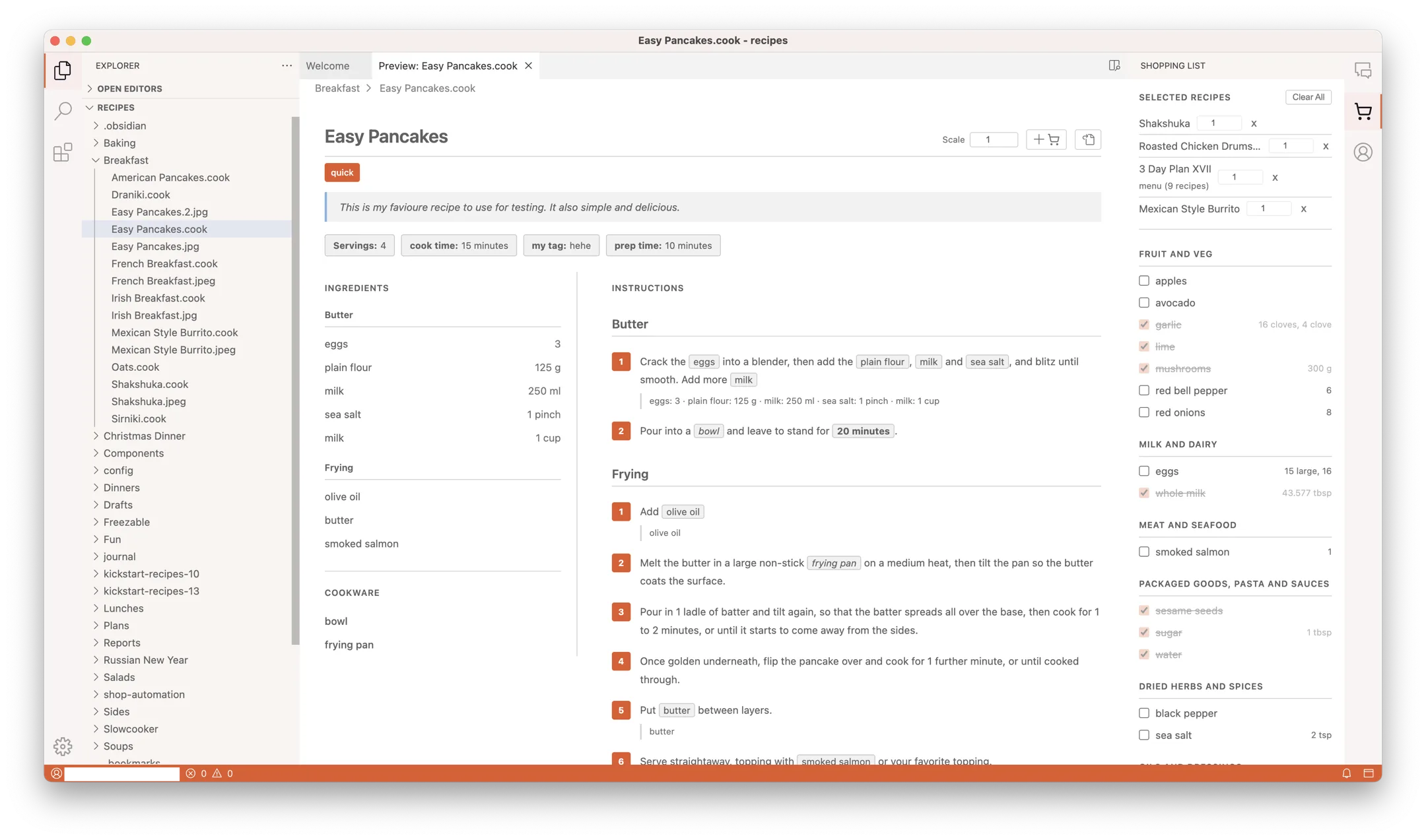

Write in plain Cooklang
Syntax highlighting, inline validation, and autocomplete for ingredients
and cookware. Your recipes stay as .cook text files —
diffable, git-friendly, future-proof.
Beautiful preview. Shopping list included.
One click turns your .cook file into a scaled, chip-tagged recipe view.
Select multiple recipes and Cook Editor builds a combined shopping list,
grouped by aisle.

Meal plans in a single file
.menu files link recipes across days and meals. Scale by household size,
see the week at a glance, and let the shopping list flow from the plan.
servings: 2
time: 25 min
Preheat the #oven{180°C}
Mix @flour{200%g} with
@eggs{3} and
@whole milk{250%ml}.
Bake for ~{25%minutes}.
Plain text files. Yours forever.
Every recipe and menu is a text file on your disk. No database. No lock-in. Readable in any editor in fifty years.
CookBot, built in
The AI assistant lives in a sidebar. It can pull in recipes and menus from your collection to answer questions, import recipes from URLs, and draft meal plans — writing changes directly to your files with your approval. Included with Cookbot Pro.
- Your files stay on your disk. CookBot only reads what you choose to share in the conversation — never your full collection.
- Every change is a diff you approve. Nothing is written to disk until you click accept.
- Open source. The editor and the CookBot integration are public on GitHub — inspect how prompts and files are handled.
Edit on your laptop.
Cook from your phone.
Cook Editor plays nicely with the Cooklang apps for iPhone and Android. Your collection and shopping list stay in sync, so you can tick items off at the store while someone else preps at home.


Simple pricing.
Cook Editor
- Full editor with syntax highlighting
- Recipe preview and scaling
- Shopping lists by aisle
-
.menumeal plans - Works with iOS & Android apps
Cookbot Pro
Cancel anytime. Pay monthly — no annual lock-in.
- Everything in Cook Editor
- Unlimited CookBot AI conversations
- Recipe import from any URL
- AI meal planning
- COOK.md personalization


 Cancel anytime
Things people ask before signing up
Where do my recipes go when I use CookBot?
.cook files stay on your local disk. CookBot is powered by Anthropic's Claude Sonnet: when you ask a question, only the specific file content you reference is sent to Anthropic for processing — never your full collection. Cook MD doesn't store conversations on our servers, and Anthropic doesn't train on API data. Every change CookBot suggests is shown as a diff and only written to disk after you accept it.
Can I cancel anytime?
How do I pay? Which cards work?
Why a subscription for a desktop app?
What happens to my recipes if I stop paying?
.cook and .menu files are plain text on your disk — they keep working in any text editor, in Cook Editor itself, and on the mobile apps. You only lose the CookBot AI features.